
Inventory overview

Warehouse -> Inventory

This report shows the inventory stock levels of warehouse items as of the selected date. ou can filter the data by warehouse and/or item.

● Inventory report fields

  1. As of – the date the report is based of
  2. Warehouse filter – shows inventory balance for the selected warehouse
  3. Item filter – shows data for a specific item
  4. Refresh – to update the inventory balance data
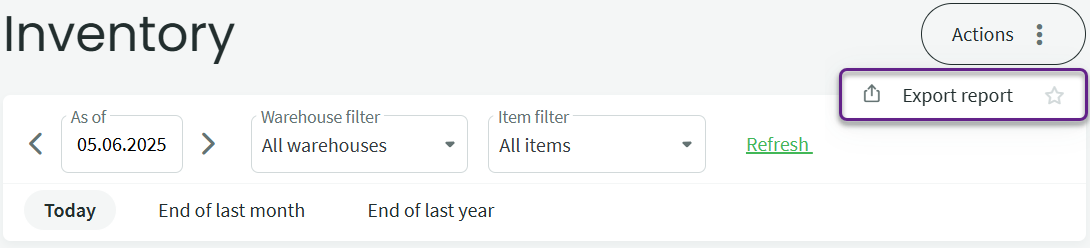
● You can save or print the report via Actions -> Export report.

In the view that opens, you can choose from the available file formats for saving the report.
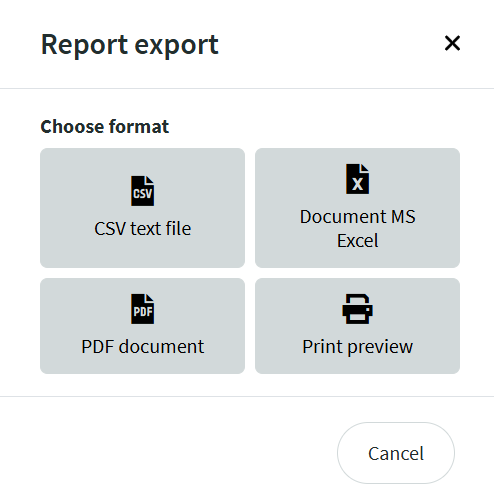
● Outflows and inflows generated from purchase and sales invoices can only be changed by editing the source documents (the invoices themselves)

● Write-offs and inter-warehouse transfers can be created under Warehouse -> Documents -> New document.

● If the recorded inventory does not match the actual stock, identify the reasons for the discrepancy and make corrections accordingly. If necessary, perform a stocktaking to adjust the inventory levels.

If you have any additional questions, please write to us at support@simplbooks.ee

Was this article helpful?

Related Articles

Leave A Comment?